Siri iPhone · English
Ask Siri how much you spent. Marnie answers.
Marnie is an expense tracker that works with Siri. Ask about your spending, a category, your budget or your next bill, and Siri reads the answer out loud with a Marnie card. Free, no app to open.
Logging by voice works today. Asking Siri about your spending arrives with Marnie 1.0.6, the next app update.


Things you can ask
Say “Hey Siri”, then ask. Marnie works out every answer on your iPhone, in your currency, so Siri reads exactly what the app would show you.
“How much have I spent this week in Marnie?”
Siri: “This week you spent $286. The most went on Groceries: $112.”
“What’s my biggest category in Marnie?”
Siri: “This month your biggest category was Groceries: $612, or 38% of your spending.”
“What’s my safe to spend in Marnie?”
Siri: “You can spend $1,510 until November 15, about $108 a day.”
“What’s my next bill in Marnie?”
Siri: “Your next bill is Netflix, $15.49, due November 4.”
Ask or log, hands-free
Name a period (today, this week, this month, last month or this year) or one of your categories. Siri can also add a transaction for you and asks you to confirm it before it's saved.
Ask
- “How much have I spent this month in Marnie?”
- “What did I spend on groceries in Marnie?”
- “What’s my biggest category in Marnie?”
- “What’s my safe to spend in Marnie?”
- “What’s my next bill in Marnie?”
- “Ask Marnie about my money”
Log
- “Add an expense in Marnie”
- “Log income in Marnie”
- “Scan a receipt in Marnie”
Answers with a card
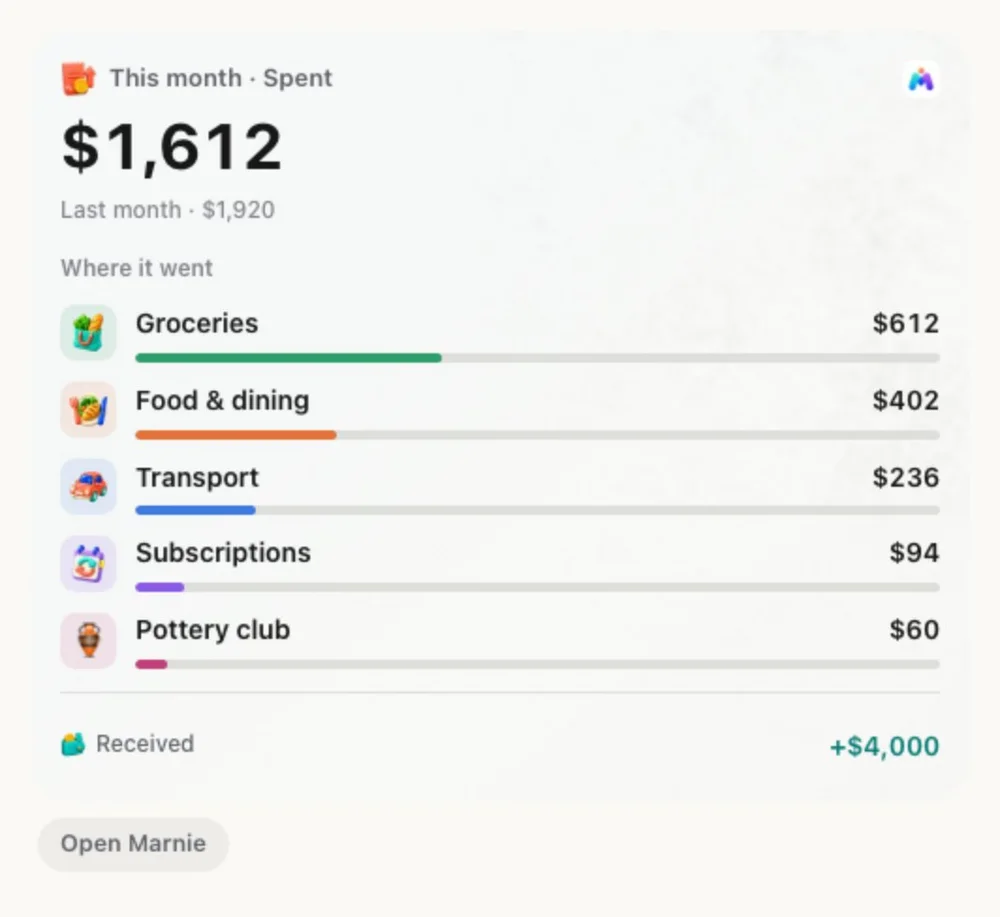
Under the spoken answer, Siri shows a Marnie card: the total, how it compares with last month, where the money went and what came in. Tap Open Marnie to see the rest.
Siri asks you to unlock your iPhone before it reads your totals, and it only answers for the account signed in to Marnie. If the answers are out of date, Siri says so instead of reading old numbers.
Shortcuts, Back Tap and the Action button
Every Siri action is also in the Shortcuts app. Put Quick Add on Back Tap or the Action button to log a payment with a tap, or add an automation that sends each Apple Pay payment to Marnie.
Siri questions
Can I ask Siri how much I spent?
Yes, from Marnie 1.0.6, the next app update. Say “How much have I spent this month in Marnie?” and Siri answers out loud with your total and top category, then shows a Marnie card with where the money went. You can ask about today, this week, this month, last month or this year.
What can I ask Siri about my spending?
Spending for a period, spending on one category, your biggest category, income received, your safe to spend amount and the next bill due. Siri can also log an expense or income, or open the receipt scanner.
Which languages does Ask Marnie support?
Asking Siri about your spending works in English. Logging an expense or income by voice and scanning a receipt with Siri also use English phrases.
Does Siri read my totals on a locked iPhone?
No. Siri asks you to unlock your iPhone before it reads your totals, and it only answers for the account signed in to Marnie.
Does Siri need the internet to answer?
Marnie prepares the answers on your iPhone whenever your records change, so Siri reads what the app has already worked out. If the answers are out of date, Siri says so and asks you to open Marnie.
Is Siri support free?
Yes. Siri, Shortcuts and the Ask Marnie answers are included on the Free plan. Logging by voice works today; asking Siri about your spending arrives with Marnie 1.0.6, the next app update.
Track spending by asking. Marnie is free to start.
Siri features are on iPhone. Marnie also runs on Android 8.0 or later. Compare plans