New ChatGPT · Claude · more
Ask ChatGPT or Claude about your money. Marnie answers.
Marnie is a budget app that connects to your AI assistant. Ask how much you spent, what bills are coming or whether you're safe to spend, and get the answer as a Marnie card. Or tell it to log a purchase, and confirm it in the app.



Pick your assistant and try it
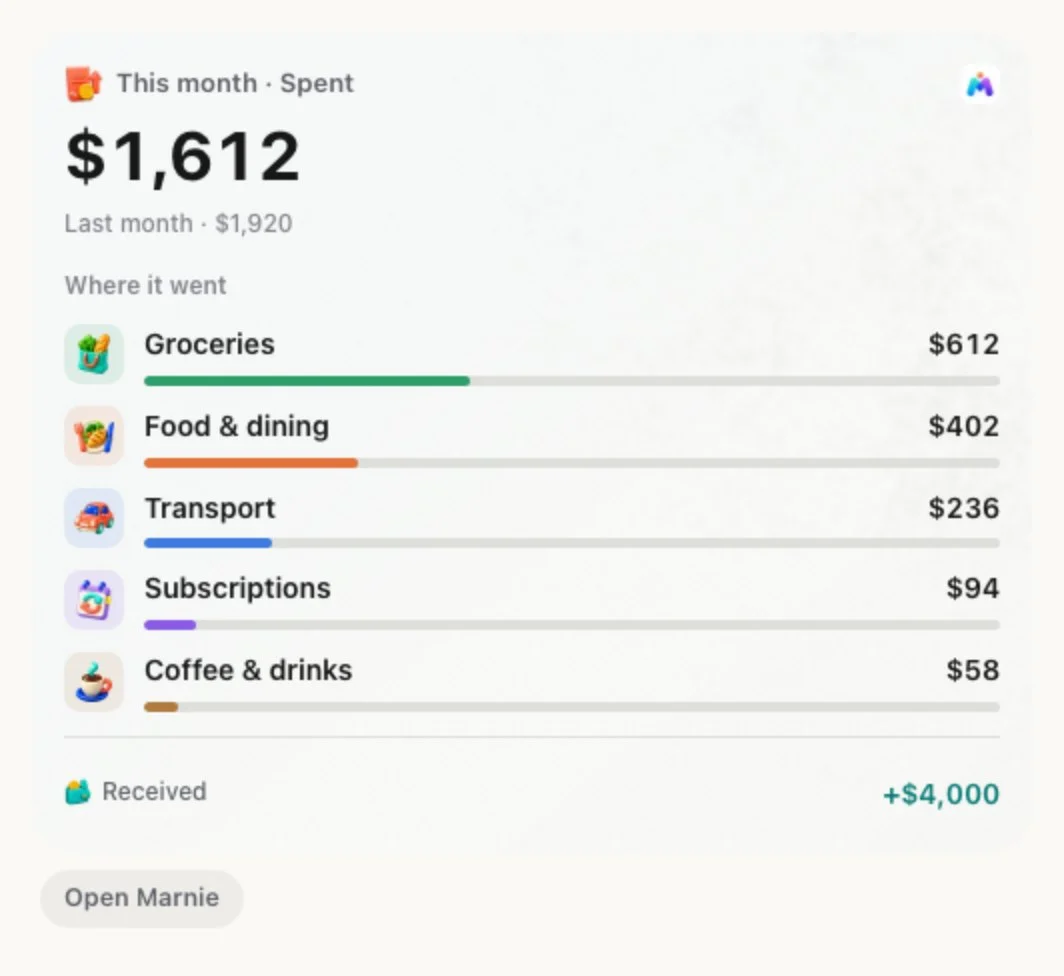
These are Marnie's real answer cards, shown here with demo data.
1 Pick your assistant
2 Ask or add
3 Connect Claude
- Settings → Connectors → Add
- Add custom connector, paste your Marnie link
- Sign in to Marnie and tap Allow
Copy your Marnie link from the guide or from Profile → AI agents in the app (Marnie Pro).
Full Claude guideHow much did I spend on food this month?
Marnie · spending_summary
$402 on food and dining so far this month, out of $1,612 in total. That's $308 less than last month overall.
Step-by-step guides
Every assistant Marnie connects to, with the exact steps, what to ask and what to do if something goes wrong.
Claude
Anthropic3 stepsMarnie cardsOpen the guideChatGPT
OpenAI3 stepsMarnie cardsNeeds a ChatGPT plan with Developer mode.Open the guideGemini
Google3 stepsText answersSupport is limited, so some answers show as text.Open the guideGrok
xAI3 stepsText answersNeeds a paid Grok plan.Open the guidePerplexity
Perplexity3 stepsText answersNeeds Perplexity Pro or Max.Open the guideHermes
Nous Research3 stepsText answersFor self-hosted agents.Open the guideOpenClaw
Open source3 stepsText answersFor self-hosted agents.Open the guide
What your assistant can see, and what it can't
Marnie shares only a short summary you switch on, never your phone's records, and an assistant can't change anything without you.
Reads a summary you choose to share
Spending by period and category, upcoming bills, safe to spend, savings goals, and the last 90 days of transactions.
Adds only with your OK
Anything an assistant adds arrives as a draft in Capture Review. Nothing reaches your records until you confirm it in Marnie.
Never shared
Balances, net worth, notes, receipts, bank messages, card or account numbers and your location never leave the phone.
Off deletes the copy
Turn it off, sign out or delete your account and the shared copy and any drafts are deleted. Unused for 30 days, it's deleted too.
How the connector works
It's a standard remote MCP connector with sign-in, the way Claude and ChatGPT connect to other apps.
You switch it on
In Marnie, open Profile → AI agents and turn on sharing. It's part of Marnie Pro and stays off until you choose it.
Marnie shares a summary, not your phone
Your records stay on your phone. Marnie keeps one short summary on its servers for your assistants, refreshed when you use the app, with every amount already worked out and formatted.
You approve each assistant
Paste the Marnie link into the assistant, sign in to Marnie and tap Allow. You can revoke any assistant later.
Ask in plain words
The assistant calls Marnie's tools for spending, transactions, bills, safe to spend and goals, and shows the answer as a Marnie card.
AI assistant questions
Can I use Marnie with ChatGPT or Claude?
Yes. Connect it, then ask Claude or ChatGPT about your spending, bills, safe to spend and savings goals, and get the answer as a Marnie card. It's part of Marnie Pro and off until you turn it on.
What can ChatGPT or Claude see?
Only the summary you switch on in Marnie: spending totals by period and category, upcoming bills, safe to spend, savings goals and the last 90 days of transactions (date, merchant, category, amount, currency and account name). Never balances, net worth, notes, receipts, bank messages, card or account numbers or your location.
Can ChatGPT or Claude add expenses to Marnie?
Yes, as drafts. Say “Add a $12 lunch at Subway” and it lands in Marnie's Capture Review. Nothing is saved to your records until you confirm it, and assistants can't edit, delete or move money.
Which AI assistants work with Marnie?
Claude and ChatGPT, with Marnie's answer cards. Assistants that let you add a custom remote MCP connector, such as Gemini, Grok and Perplexity, get the same answers as text; some need a paid plan. Each one has a step-by-step guide at /ai-agents.
Is the AI connector free?
No. Connecting an AI assistant is part of Marnie Pro. Siri, widgets and Android capture stay free.
How do I turn it off?
Switch off AI agents in Marnie's Profile. Every assistant is disconnected and the shared copy and any drafts are deleted from Marnie's servers.
Connect your AI agent today.
Marnie is free to start on iPhone and Android. The AI connector is part of Marnie Pro.